How Do You Reserve a WhatsApp Username Before Someone Else Takes It?
Reservation is open right now and names are going one at a time. The handle you want is only yours once you save it.
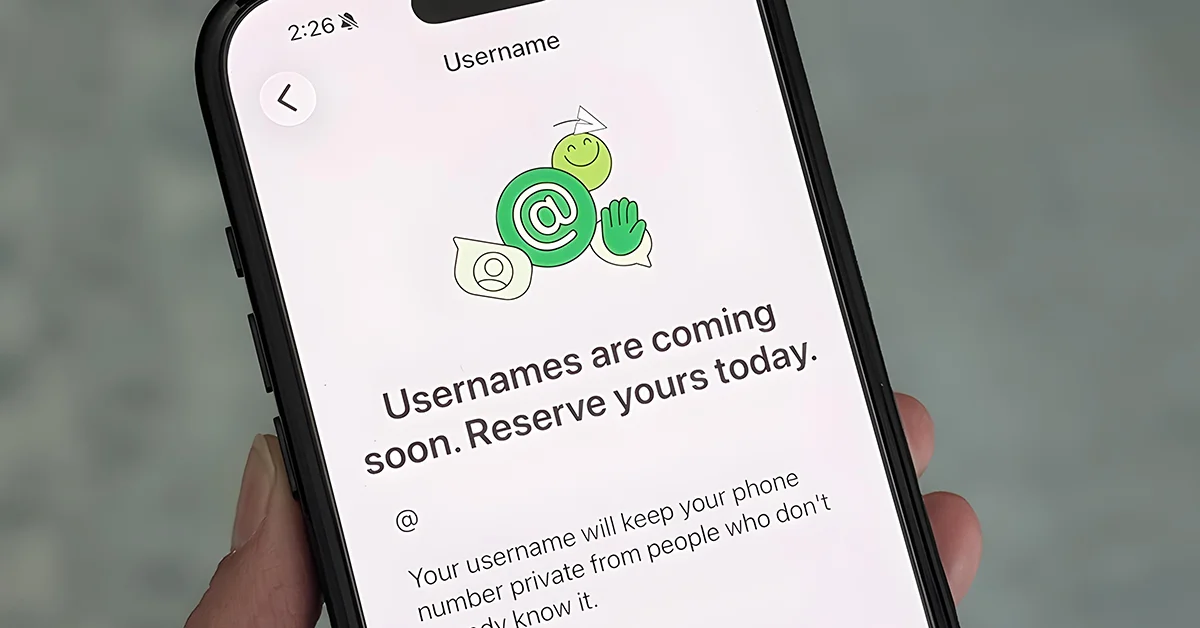
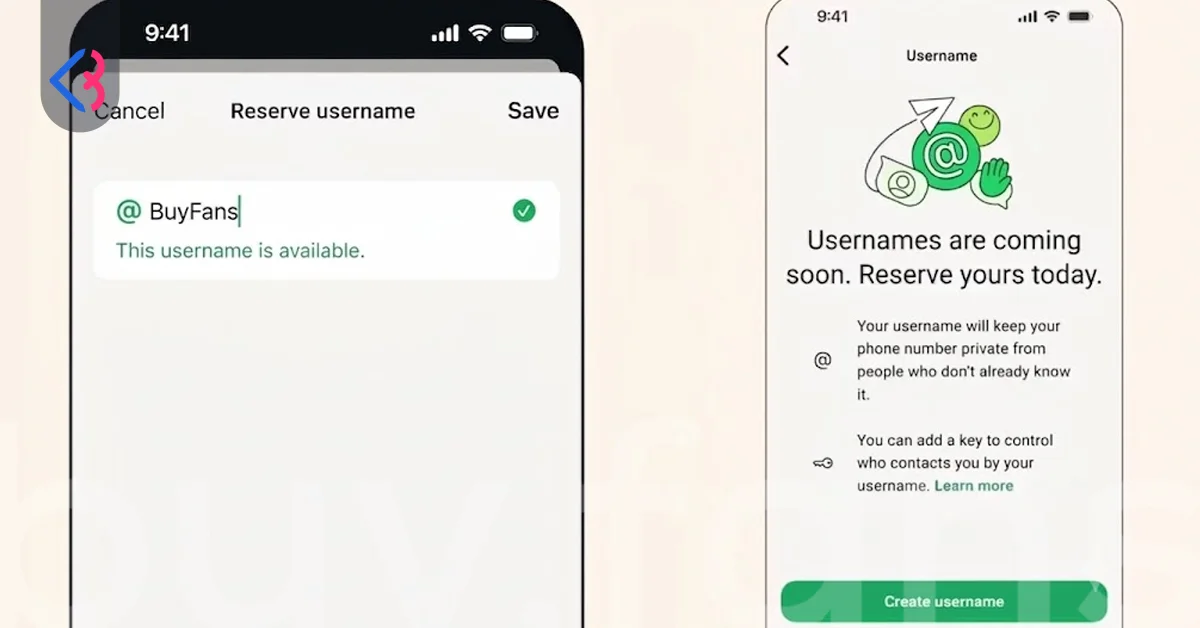
You reserve a WhatsApp username by opening the reservation flow inside the app and saving the handle you want, and the reason to do it today rather than next month is that a username is unique across the entire service. Two people cannot hold the same one. WhatsApp announced the feature on 29 June 2026 and opened reservation the same week, well before the full username experience reached most accounts, and reservation was still open in early August. That gap is deliberate. It gives you a window to lock a name down before the feature goes wide and the obvious handles disappear.
Reserving is not the same as using. A reserved name sits dormant until the full feature reaches your account, so nobody can see it, search it or message you with it in the meantime. What reservation buys you is ownership. Everything below is about winning that race and choosing something you will still want in three years.
Why WhatsApp Opened Reservation Ahead of the Full Rollout
Meta says more than three billion people use WhatsApp. Every one of those accounts draws from the same pool of handles, which makes this the largest single namespace ever opened to the public at once. Compare it to signing up for a social platform on day one versus year ten: the difference in what is still available is enormous, and here the whole world reaches day one simultaneously. Opening reservation early spreads that rush over weeks instead of collapsing it into a single afternoon when the feature goes live.
The rollout itself is running account by account, not country by country. Around 16 and 17 July 2026 the full username experience reached a very limited number of iOS and Android users, according to sources tracking beta releases, and on 20 and 21 July a promotional banner tagged as a major update appeared on the App Store and Google Play listings. None of that means the feature is live for you. Your neighbour on the same network and the same phone model can have it while you do not. Reservation, though, does not depend on you having the full feature, which is exactly why it opened first.
One regulatory caveat is worth carrying with you. On 1 July 2026 the information technology ministry in India sent WhatsApp a formal notice and asked the company to hold the feature's release in the country until consultations conclude, citing fraud, phishing and impersonation risks. A pause in one market does not change the global pool. If anything it shows how seriously the naming layer is being treated.
Which Usernames Are Already Off the Table?
A large slice of the namespace was walled off before the public ever saw the reservation screen. Names belonging to public figures, government bodies and Meta Verified accounts are held for their owners, and so are lookalike variants of those names. If you were planning to grab a celebrity's handle with an underscore dropped in the middle, that door is closed. Handles already in use on Instagram or Facebook are also held for the people who own them there, which removes a very large set of the shortest and cleanest options.
Certain words are blocked outright rather than reserved. Terms tied to illegal or age inappropriate activity are rejected, as are words that cause serious harm, and a set of authority signalling words including bank, government, police and verified has been blocked as well. The logic is straightforward. A handle that reads like an official channel is a scam waiting to happen, so WhatsApp removed the raw material. Accounts caught impersonating someone or running scams lose the username and get the account banned, which means a stolen looking handle is a liability rather than an asset.
There is no browsable directory of usernames, no suggestion list and no partial match search. Availability is something you discover by typing a candidate into the app and seeing whether it saves. Third party sites promising to check availability cannot see WhatsApp's index. Bring three or four candidates to the screen instead of one, because you will be testing them one at a time.
One rumour deserves killing here. People have claimed publicly that they reserved well known handles ahead of everyone else, and Meta has denied it. Treat any offer to sell you a premium WhatsApp handle as a scam.
How Do You Claim Your Instagram or Facebook Handle on WhatsApp?
If you already use a handle on Instagram or Facebook, WhatsApp holds it for you rather than releasing it to the first person who types it. Claiming it means adding your WhatsApp account to Accounts Center and confirming that you own the other profile. Once ownership checks out, the options to use your Instagram username or Facebook username become available on WhatsApp. Linking accounts in Accounts Center is not required for WhatsApp generally; it only matters if you want to carry a name across.
The condition attached to this is the single most expensive detail in the whole feature, and it is easy to miss. If you claim a name from Instagram or Facebook, you have to install WhatsApp to keep it. Do not install, and the name can be taken by someone else. Picture a photographer with a strong Instagram handle and no WhatsApp account who assumes Meta will hold the name indefinitely because it belongs to the same company. That assumption costs them the handle. Claiming through Accounts Center starts the protection; installing the app is what completes it.
Nothing syncs back the other way, either. Change your username on Instagram or Facebook after the transfer and your WhatsApp handle stays exactly as it was. The two are separate records from the moment the claim finishes, so a rebrand means editing each platform by hand. And if the same name is yours on Instagram but belongs to a different person on Facebook, there is a genuine race between you and them. Whoever completes the claim first keeps it.
Situation | What WhatsApp does | What you must do |
| You hold the name on Instagram or Facebook | Holds it for you | Add WhatsApp to Accounts Center, verify ownership, then install WhatsApp |
| You claim it but never install WhatsApp | Protection lapses | Install the app to keep the handle |
| You rename on Instagram after claiming | Nothing changes on WhatsApp | Edit the WhatsApp handle separately |
| Same name, you on Instagram and someone else on Facebook | Open to both | Claim first |
How Should You Choose a Handle You Will Not Regret?
The strongest handles survive a change of job, city or hobby. A name built around a current employer, a birth year or a niche you may leave behind will feel wrong within a couple of years, and switching later is not free because your previous handle becomes available to strangers the moment you release it. Pick something anchored to you rather than to a phase of your life.
Punctuation is where most people lose their preferred name and then find it again. Capitalisation is ignored by the system, so a name typed with capitals and the same name in lowercase are treated as one. Dots and underscores work differently and count as distinct characters, which means a handle taken in its plain form may still be free with a separator placed inside it. Test the clean version first, then work through separators before you abandon a name you actually like.
Say your candidate out loud before you commit. People will read your handle off a business card, hear it over a phone call and type it from memory, and there is no partial match search to rescue them if they get it slightly wrong. A name with a doubled letter, an ambiguous number or an unusual spelling generates failed attempts every time you share it. Short and pronounceable beats clever.
Naming approach | Example pattern | Why it holds up |
| Name plus a stable descriptor | firstname.surname | Survives job changes and rebrands |
| Name plus separator variant | first_last | Recovers a taken handle without changing the name |
| Existing handle from another platform | Your current Instagram name | One identity everywhere, easier for people to recall |
| Trade plus location | trade.cityname | Works for solo professionals with a fixed service area |
| Employer or trend based | company2026 | Weak. Ages badly and forces a costly change later |
What Happens If Someone Takes the Name You Wanted?
There is no queue, no waiting list and no appeal for a handle that simply went to somebody faster than you. First saved, first served. The only routes to a name held by another account run through misuse rather than preference: if the account is impersonating you or running a scam, WhatsApp revokes the username and bans the account, and if your registered trademark is being infringed there is a complaint path through WhatsApp's Intellectual Property Policy. Wanting the name more is not a route.
Names do return to the pool, though, and the timings differ depending on how they are released. When somebody changes their username, the old one becomes available to other people immediately with no cooling off period. When somebody deletes a username, the owner reportedly has 14 days to reclaim it before it drops back into the pool, although WhatsApp has not confirmed that window officially. A handle that failed for you last week may be free tomorrow, so it is worth retrying occasionally rather than assuming the answer is permanent.
Retry, but pace yourself. Making many attempts in a short burst triggers a temporary block, so a handful of tries spread across days beats hammering the field. Meanwhile, secure a workable second choice now. Holding a decent handle while you wait for a better one costs you nothing, since changing later is possible, and it means you are not sitting unnamed while the pool drains around you.
Deleting a Username Versus Changing It
The two actions look similar on screen and behave very differently underneath. Changing a name swaps one handle for another and releases the old one straight away, which is what makes an impulsive change risky: five minutes of second thoughts is enough time for the previous handle to be gone. Deleting removes your handle without replacing it, and reports suggest a 14 day window to take it back, though that figure has no official confirmation behind it.
There is also a reported difference in how the two affect your existing conversations. Deleting a username is said to make your phone number visible again in chats where it had been hidden, while changing to a new username reportedly does not have that effect. Neither behaviour has been confirmed by WhatsApp, so treat both as reported. The safer habit is simple. If you want a different handle, change it rather than deleting and starting over.
One structural limit catches people out during phone upgrades. A username cannot be moved between devices. What it can do is follow a change of phone number on the same device, so switching your number while keeping the same handset keeps the handle intact. WhatsApp has also confirmed that the number of username changes is limited, without publishing the figure, which is another reason to treat each change as deliberate rather than casual.
Action | Old handle availability | Recovery | Effect on existing chats |
| Change to a new username | Free for others immediately | None once taken | Number reportedly stays hidden |
| Delete the username | Reportedly held 14 days, then released | Reportedly possible within 14 days | Number reportedly becomes visible again |
| Move to a new device | Not possible | Not applicable | Handle does not transfer |
| Change your number on the same device | Handle stays yours | Not applicable | Handle carries over to the new number |





Business Username Rules Brands Should Plan Around
Business accounts run on a tighter rule set than personal ones, and a brand that plans its handle using personal account rules will hit a wall. A business username maxes out at 25 characters against 35 for personal accounts, and it accepts only lowercase letters from a to z plus the digits 0 to 9. Dots and underscores are not allowed at all, which removes the separator trick that rescues so many personal handles. A long company name with a word break in the middle has to become one unbroken string or get shortened.
Two more constraints shape the plan. Each phone number gets one username, so a company running several numbers for different branches or departments needs a separate handle for each and should map them before anyone starts typing. A business phone number also stays visible in the business profile rather than being hidden, so the username is a reachability and branding tool here rather than a privacy one. Business handles are created from the Tools tab under Profile using Create username. In the chat window, WhatsApp shows a saved contact name first, then a verified business name, then the username, then the phone number.
Official Business Accounts carry an extra layer of naming rules on the display name itself. All capitals are not allowed, neither are emoji or symbols such as the registered trademark mark, and no variation of the word WhatsApp may appear anywhere in the name. Names of three characters or fewer are rejected, and a name cannot be only a generic term such as a product category or only a general geographic location such as a city. A boutique that wants to be known as the city name alone will be refused; the same boutique combining its brand with the city will pass.
Rule | Personal account | Business account |
| Maximum length | 35 characters | 25 characters |
| Allowed characters | Letters, numbers, dot, underscore | Lowercase letters and numbers only |
| Separators | Dot and underscore allowed | Not allowed |
| Phone number visibility | Hidden on a first message | Stays visible in the profile |
| Handles per number | One | One |
| Creation path | Settings area of the app | Tools tab, then Profile |
This article was last updated on 04 November 2026 wednesday. Today, 49 visitors read this article.