Can You Invite Non-WhatsApp Users To A WhatsApp Event?
Not today, and WhatsApp's own help pages say so in plain words. A reported beta build may change that, but only on some Android phones for now.
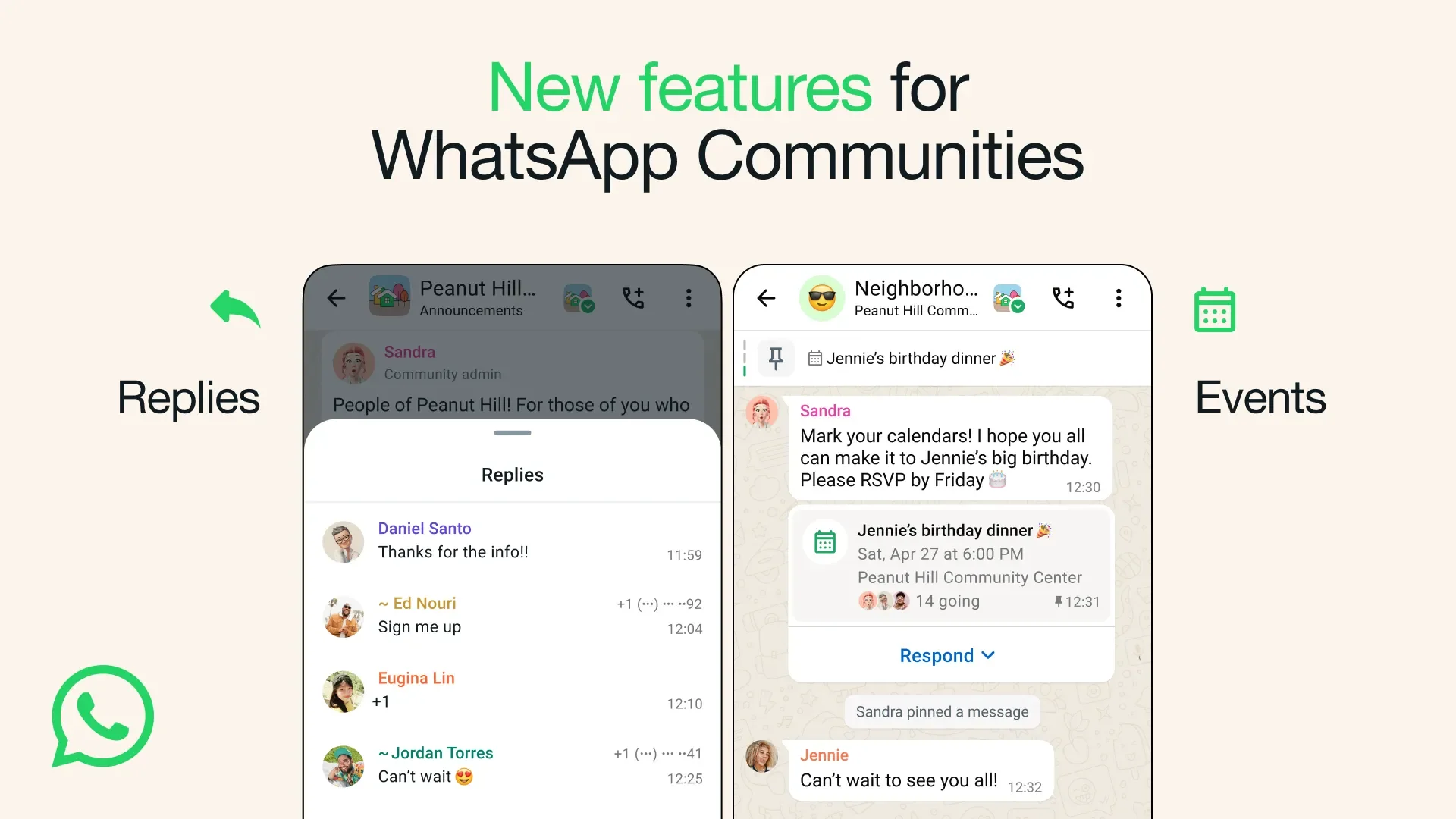
No. As of 12 September 2026, you cannot invite someone without WhatsApp to a WhatsApp event. WhatsApp's help documentation states that people who are not in the individual chat or group chat cannot be invited, and that events cannot be forwarded to another chat. A guest needs an account and a place in the chat before the event exists for them at all.
The headlines you may have seen come from a different layer. Since 11 September 2026, outlets that track beta builds report an events hub inside Settings on some Android beta installs, complete with an invite link that people without an account can open. That is a description of a test build, not a feature you can plan a meetup around next weekend.
The rest of this page keeps the layers apart. You get the official position, what the reported build changes, who would see what on the guest list, and the workarounds that already work if you manage a community, run a small business or host fan meetups.
What Is The Official Answer Right Now?
The official answer is no, because an event can only reach people who are already in the chat where it was created. The help page lists this as a restriction, right next to the note that events cannot be forwarded to another chat. There is no share button that produces a public page, no QR code, and no way to send the event card to a contact who sits outside the group. If your cousin is not in the family group, the family barbecue does not exist for her.
The restriction also works over time. New members cannot see events created before they joined, according to the same page. Adding a guest to the group after you have posted the event does not fix the problem, then. You would need to create the event again once the newcomer is in, or repeat the details as a normal message.
WhatsApp does not explain why the limit exists, and this page does not guess. What matters to a host is the practical effect. An event is a message inside a chat, with exactly the audience of that chat, and nothing more.
Where WhatsApp Events Live Today
Events can be created in an individual chat, a group chat, a Community group and, with an admin restriction, a Community announcement group. The feature started in Community groups with WhatsApp's 1 May 2024 blog announcement, spread to every group in August 2024 according to reports based on release notes, and reached individual chats with WhatsApp's 9 April 2025 blog announcement. Each of those places is a closed audience.
| Chat type | Can an event be created here? | Who can create it | What a host should know |
|---|---|---|---|
| Individual chat | Yes | Either person in the chat | Available on Android, iPhone and WhatsApp Web |
| Group chat | Yes | Any member, admin status not required | Available on every platform, including the Windows and Mac apps |
| Community group | Yes | Any member of that group | The Events section in Communities lists only upcoming events |
| Community announcement group | Yes | The Community admin only | Reaches every Community member with a single post |
| Windows and Mac desktop apps | Yes, in group chats | Any group member | Only group chat events are documented for the desktop apps |
The row that matters most for wider invites is the announcement group. Only a Community admin can create an event there, and every member of the Communities structure sees it without being added to a separate group. A large Community is still a closed audience, though. Nobody outside it receives the event, and nobody outside it can respond.
Desktop is the smaller caveat. Only group chat events are described for the Windows and Mac apps. If you plan from a laptop, create the event in a group, or open WhatsApp Web, where individual chat events are supported too.
What Does The Reported Events Hub Change For Guests Without An Account?
According to outlets that track beta builds, the reported hub adds an invite link, and a person who opens it can respond by entering a name and verifying a phone number, without holding a WhatsApp account. The reports date from 11 September 2026 and describe an Android beta. A new section inside Settings carries a badge and lists every event you created or were invited to. Creating an event from inside a chat is said to continue as before, so the hub sits on top of the existing flow rather than replacing it.
For the guest without an account, the reported flow runs like this. They tap the link, type a name, complete phone number verification, and pick a response. The location and the WhatsApp call link stay hidden until the guest has confirmed attendance, which would keep the venue out of view for anyone who opens the link out of curiosity. A cover photo and a default reminder set to 1 hour before the start are also described.
The contradiction is direct. WhatsApp's help documentation says people outside the chat cannot be invited to an event. The beta reports describe a link that invites people who do not even have the app. Both are current on 12 September 2026, because the help page describes the released product and the reports describe a test build. Until the help page changes, the official answer stands.
| Capability | Official today, per WhatsApp's help documentation | Reported in Android beta, per outlets that track beta builds |
|---|---|---|
| Inviting someone outside the chat | Not possible | Possible through an invite link |
| Inviting someone with no WhatsApp account | Not possible | Reported possible after name entry and phone number verification |
| Forwarding an event to another chat | Not possible | No change reported |
| Where your events are listed | Under the chat name or group name, then Events | A badged section inside Settings listing created and invited events |
| Location and call link visibility | Visible to everyone in the chat | Visible only after a guest confirms attendance |
| Cover photo | Not offered | Reported |
| Reminder | Notification to Going and Maybe guests when the event starts, plus an early reminder for group events since WhatsApp's 7 January 2026 blog announcement | Default reminder reported at 1 hour before the start |
| Platforms | Android, iPhone, WhatsApp Web, Windows and Mac | Some Android beta installs, no iOS information, no release date |
Read the right column as a preview, not a promise. Nothing guarantees that every field in the test build reaches the stable version unchanged, and no date has been given for a wider release.
Who Can See The Guest List And Phone Numbers?
In the reported hub, the host sees every guest's name, response and phone number, while guests see each other's names and responses but not each other's numbers unless a number is already saved in their contacts. That is the guest list rule as the beta reports describe it, and it applies to the invite link flow rather than to events inside chats.
The split matters for anyone hosting strangers. A creator running a fan meetup collects numbers as host, which helps with a headcount but also carries a duty of care. Guests, meanwhile, see who else said Going or Maybe without receiving a list of phone numbers. If a guest already has another guest saved as a contact, that number shows for them, the same way a saved contact shows anywhere else in the app.
Inside a chat event today, the picture is simpler. Everyone in the group shares the same space, and the responses under the event are visible to the whole chat. A closed invite among friends loses nothing here. An open invite to a public meetup would expose the venue to every member from the moment of posting, which is the gap the reported link flow appears designed to close by hiding location and call link until a guest confirms.
Guests often ask what to tap. The official choices are Going, Maybe and Not going, with an extra option to say you are bringing someone when the host has allowed a plus one. Guests who choose Going or Maybe receive a notification when the event starts, per the official documentation.
How Do You Plan An Event Around This Limit Today?
Add every guest to the chat before you create the event, and for anyone who refuses to join WhatsApp, send the details as a plain text message or an email instead. Order matters because of the new member rule. Anyone who joins the group after the event is posted will not see it, so settle the guest list first, create the event once the list is stable, and treat late additions as a cue to repost the details.
For a person outside WhatsApp altogether, no workaround puts them on the guest list today. What you can do is copy the event details into a message they will receive, ask for a reply, and record their answer yourself. Keep the name, date, time and location in that message, since those are the fields the event carries, and the description field accepts up to 2,048 characters, so the same text fits in both places.
| Situation | What to do today | What you give up |
|---|---|---|
| Guest has WhatsApp but is not in the chat | Add them to the group, then create the event | Nothing, as long as they join before you post |
| Guest joined the group after the event was posted | Post the details again as a message, or create a fresh event | The original event never appears for them |
| Guest has no WhatsApp account | Send name, date, time and location by text or email and track the reply by hand | RSVP buttons, reminders, plus one, call link |
| Guests are spread across several groups | Create the event in each group, or bring the groups into a Community | Forwarding is not possible, so each copy keeps its own responses |
| You want a page anyone can open | Not possible in WhatsApp today | Use Facebook Events for the public layer and a WhatsApp group for confirmed guests |
Use a group as your event hub while the official one remains a report. Pin the event so it stays at the top of the chat, keep the RSVP conversation inside the same group, and post changes as replies to the event message. That gives you a single place for the guest list without waiting on an update that has no public date.
Announcement Groups As A One-To-Many Invite Channel
A Community announcement group is the closest thing WhatsApp offers to a broadcast invitation. Only a Community admin can create an event there, and every member of the Community sees it without joining another group. For a community manager whose members are split across topic groups, this avoids posting the same event in each of them and ending up with several separate guest lists.
Announcement groups are admin-led by design, so the chatter that usually surrounds an event happens in the topic groups, while responses land on the event itself. That suits a customer event run by a small business, where the owner wants a clean headcount rather than a long thread. It suits a creator less well when the point of the meetup is the conversation before it.
The same limits still apply. The Community is a closed audience, so the invite does not reach anyone who has not joined it. The Events section in Communities lists only upcoming events, which helps guests scan what is next but means past events drop out of that view once they end.
How Does This Compare With Facebook Events For Open Invites?
Facebook Events, another Meta product, allows public events that anyone can find and respond to, which a WhatsApp event cannot do today. The difference is structural. A Facebook event page can be public, can be shared by URL, and lets people respond without any prior relationship to the host. A WhatsApp event is a message inside a private chat with a fixed audience.
Which to pick depends on who the guests are. A fan meetup promoted to the public belongs on a platform with an open page, and WhatsApp then serves as the confirmed circle where the location and the call link are shared. A customer appreciation evening for a business with a known client list fits WhatsApp better, because those clients already sit in a group or an individual chat, and the RSVP names, Going, Maybe and Not going, appear right under the message.
Do not read the reported hub as a Facebook Events replacement. The beta reports describe a link, name entry and phone number verification. They do not describe search, public listings, or a page that lives outside the app. If the link ships broadly, the gap narrows for guests you can reach directly, and stays open for guests you have never met.





Should You Wait For The Hub Or Work With What Exists?
Work with what exists, because the hub has no public release date, no confirmed iOS version and no official announcement as of 12 September 2026. A gradual rollout on Android beta means even beta testers do not all have it. Reports describe the feature reaching some installs and not others. If you are planning something for the coming weeks, build it on the official layer and treat the hub as a bonus if it appears on your phone.
| Event type | Who the guests are | Best option today | Worth waiting for the hub? |
|---|---|---|---|
| Closed friend group | Friends who are all on WhatsApp | Create the event in the existing group chat | No, nothing is missing |
| Closed friend group with an outsider | Friends plus a person who does not use WhatsApp | Group event for members, plain message or email for the outsider | Only if that person will never install the app |
| Open community meetup | Public, mostly strangers | Facebook Events for the public invite, a WhatsApp group or Community for confirmed guests | Yes, if the date is months away and a link would simplify entry |
| Business customer event | Known customers, some without WhatsApp | Community announcement group for members, email for the rest | Partly, the reported link would replace the email layer |
| Creator fan meetup | Fans reached through other platforms | Public post elsewhere, WhatsApp group for confirmed attendees, location shared in the chat | Yes, the reported flow hides location until confirmation, which suits strangers |
If the hub reaches your phone, check the official documentation before relying on it with guests. That page describes what every guest will see, whatever build they run. A beta feature can change between builds, and there is no guarantee that every field in the test build reaches the stable version as reported.
For the guest who is not on WhatsApp, the honest position on 12 September 2026 is the same as the first line of this page. You cannot invite them yet. You can add them to the chat if they are willing to install the app, and you can carry the details to them by hand if they are not. Everything beyond that is a report about a build most phones do not have.
This article was last updated on 24 October 2026 saturday. Today, 29 visitors read this article.