Can Someone Without WhatsApp Join A WhatsApp Call?
As of 15 September 2026, a person needs a WhatsApp account to open a call link and join the call, and the official help pages say so in plain words. A browser-based guest option has been spotted in beta builds, but it is still in development and has not been switched on for anyone, beta testers included.
That answer matters if you host calls for people who never installed the app. A client who lives on another platform, a fan who found you somewhere else, a relative who refuses to add one more messenger. Each of them can receive your link today, and none of them can open it until they sign up.
The official feature set still covers most host problems. Links can be created on phone and desktop, sent to any number, protected with a waiting room, and attached to a calendar invite. The guest option, if it ships, would remove the sign-up step for the person on the other end. It has not shipped.
Is An Account Required To Open A Call Link Today?
Yes, an account is required, and the rule applies wherever call links exist. WhatsApp's help documentation describes the feature as a way to let "anyone with a WhatsApp account" open your link and join the call. There is no exception for browsers, none for one-time visitors, and none for business accounts hosting outsiders. A person who has never registered a number cannot get past the link.
Call links first appeared in the official blog on 14 December 2022, and the desktop apps covered by WhatsApp's 12 December 2024 blog announcement follow the same account rule. Windows and Mac users create and open links with the account already tied to their phone. The link is an invitation into a WhatsApp call, not a public room.
Most confusion online comes from mixing the official layer with the beta layer, so the table keeps them apart.
| Question | Official today | Reported in beta |
|---|---|---|
| Can a person join with no account? | No, every link requires an account | Yes, through a browser, after the host approves |
| Where does the link open? | In the WhatsApp app on phone or desktop | In a browser session with its own encryption key |
| Does the host approve joiners? | Optional, through Require approval to join | Mandatory for every guest |
| Who can use it right now? | Every account holder on a current app version | Nobody, not even beta testers |
| Source | Help pages and official blog posts | Beta-tracking coverage dated 7 and 14 September 2026 |
What Do The Guest Call Reports Actually Describe?
They describe a browser-based path for a person with no account to open a call link and join through a browser, with the host approving each guest by hand. Outlets that track beta builds report that WhatsApp guest calls, as the coverage labels the feature, surfaced on the web side on 7 September 2026 and inside an iOS beta build on 14 September 2026. In both sightings the guest never installs the app or registers a number. The host still runs the call from a normal account.
Several details stand out in those reports. First, host approval is mandatory for guests, while account holders can still be admitted automatically if the host leaves the waiting room off. Second, each browser session receives a unique identifier, and the session key used for encryption is derived from it, which is how the reports explain the call staying end-to-end encrypted. Third, the whole thing is described as work in progress, spotted inside a build rather than offered in a menu.
That last point deserves emphasis. A feature visible to people who inspect TestFlight builds is not a feature you can turn on. As of 15 September 2026, the guest path has not been opened to beta testers, so no host can test it and no guest can try it. Treat every headline that says otherwise as a summary of the reports, not a description of the product.
What The Beta Reports Leave Out
The reports give no release date, and none of the coverage claims to know one. Android goes unmentioned, so an Android host cannot assume parity with the iOS sighting. Supported browsers are not listed either, and nothing says whether guests would join from a phone browser, a desktop browser, or both.
The silence extends to limits. Nothing in the reports says how many guests a call could hold, whether guests could share video or only audio, or whether a guest could rejoin after dropping. The 30 days expiry rule is another open question, since no report says whether it would apply to a guest opening the link in a browser. Until an official help page covers these points, any figure you see attached to guest calls is a guess.
For planning, that means one thing. Do not promise a client, a fan community, or a family group that they can join a WhatsApp call without an account by a certain date. Outlets that track beta builds report on features that can ship later, change shape, or never appear. Build your process around the account rule that exists today, and treat the guest option as a bonus if it arrives.
What Can A Host Do Right Now?
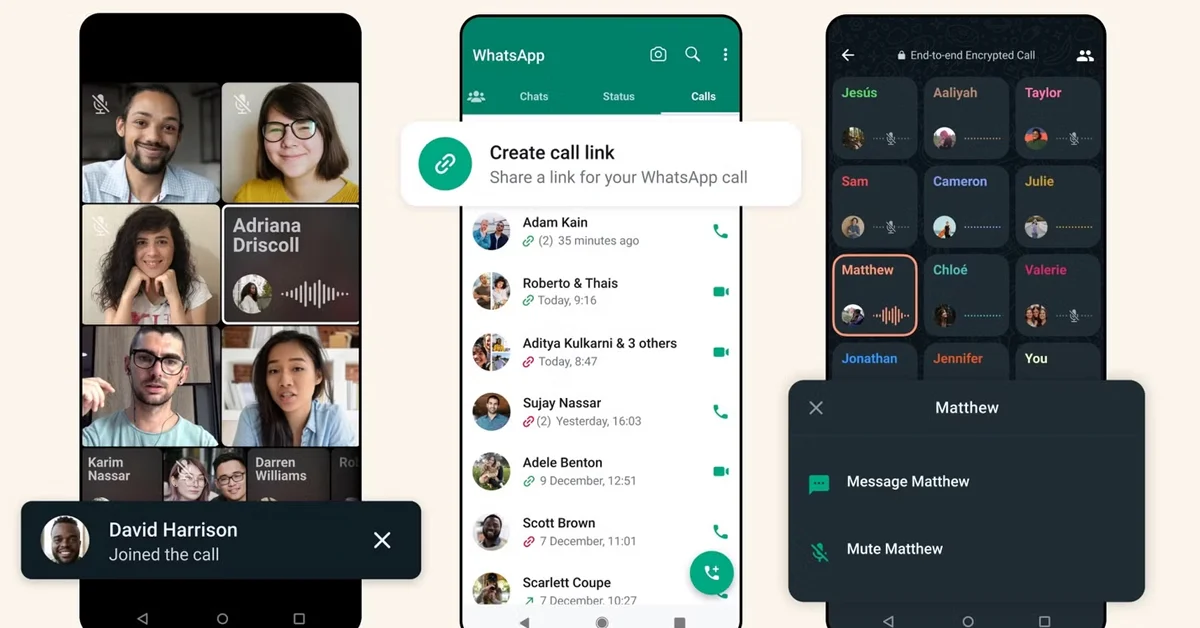
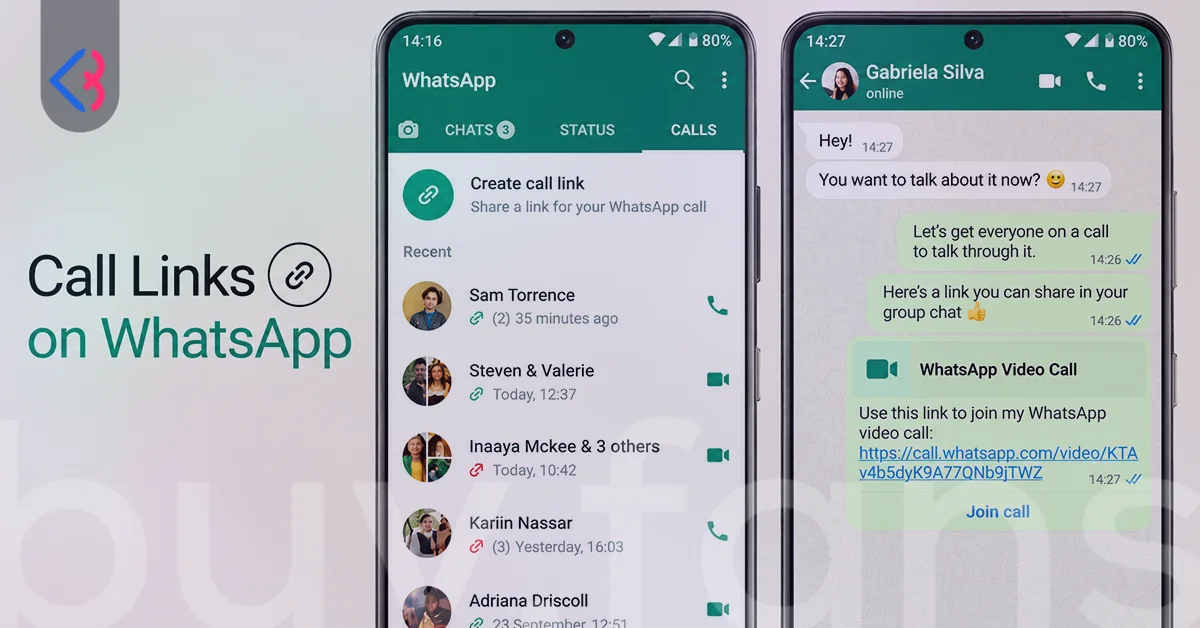
You can create a call link, send it to the person's phone number, and ask them to install the app before the call starts. The link lives in the Calls tab on phone and desktop alike, and the steps are short.
- Open the Calls tab.
- Tap the new call icon and choose New call link.
- Pick Video or Voice.
- Copy the link, send it inside WhatsApp, or share it through any other app.
The person on the other end still needs an account. Send the link well before the call so they can install the app, verify their number, and test the link ahead of the scheduled time. A plain text message to their number works, and so does an email.
For participants who already have accounts, switch on Require approval to join when you create the link. WhatsApp's English help documentation describes this as a waiting room that only the link creator can see, with a Participant list during the call where you admit people one at a time or tap Approve all. The room holds 128 people. A host who shares a link widely, for instance in a fan community, gets a filter between the link and the live call.
You can also fix the time in advance. WhatsApp's 14 August 2025 blog announcement introduced an option to schedule a call, and the iOS and Mac help pages mention adding a call link to your calendar. WhatsApp's group calls help page notes that links can be created ahead of time and shared through a calendar invite, with Outlook and Google Calendar given as examples. A calendar entry with the link inside it removes the "where is the link" message from your inbox on the day.
How Do Guest Chats Differ From Guest Calls?
Guest chats are a text only way to exchange messages with someone who has no account, while guest calls would put that person into a voice or video call through a browser, and the two are separate features that happen to be in beta at the same time. Outlets that track beta builds report that guest chats start from a link generated in the invite a friend section, carry text and nothing else, and expire after 10 days without activity. No help page covers either feature yet.
Neither of these is the third-party chat interoperability offered to users in the European Union. That arrangement connects WhatsApp with other messaging services under regional rules, and it has nothing to do with a browser guest joining a call. Search results mix these together often, which is one reason the "no account needed" headline spreads faster than the details behind it.
| Feature | Guest chats | Guest calls |
|---|---|---|
| What the guest does | Sends and receives text messages without an account | Joins a voice or video call from a browser without an account |
| Where it starts | A link from the invite a friend section, according to the reports | A call link opened in a browser, according to the reports |
| Media | Text only | Voice and video, details unconfirmed |
| Host approval | Not described | Mandatory for every guest |
| Expiry | 10 days of inactivity ends the chat | Not described |
| Status on 15 September 2026 | Beta, no official help page | In development, not open to beta testers |
| Same as EU third-party chats? | No | No |
How Does A Call Link Compare With A Generic Meeting Link?
A WhatsApp call link is tied to accounts on both ends, while a generic meeting link from a video conferencing service usually opens in a browser for anyone who holds it. That single difference explains almost every complaint about call links from people who host mixed groups. It also explains why the guest call reports drew so much attention, since the missing piece is the browser join that meeting tools have offered for a long time.
The trade-off runs the other way on reach and setup. Most of your audience already has WhatsApp on their phone, so an account holder joins with one tap and no download. Calls are end-to-end encrypted by default, and the host does not build a meeting room, pick a plan, or manage a separate login. For a call between people who all use the app, the link is the shortest path available.
| Aspect | WhatsApp call link | Generic meeting link |
|---|---|---|
| Account needed to join | Yes, on every platform today | Often no, browser join is common |
| Where it opens | WhatsApp app on phone or desktop | Browser or a dedicated app |
| Host approval | Optional waiting room that holds 128 people | Varies by service and plan |
| Link lifetime | Expires after 30 days without use | Varies, often tied to a scheduled event |
| Encryption | End-to-end encrypted by default | Varies by service |
| Best fit | Groups where everyone already uses the app | Groups with outsiders who will not install anything |
The practical split for a host is simple. If everyone on your list already uses WhatsApp, the call link wins on friction. If even one person will not install the app, a generic meeting link is the only option that works today, and you can still send that link through WhatsApp to the people who are there.

Link Security Basics For Hosts
Anyone who holds your call link can join your call, and the help page carries a plain warning to share it only with people you trust for exactly that reason. The link does not check who forwarded it. A fan who passes it into a public group hands the call to everyone in that group. A waiting room through Require approval to join is the fix, and it is the one setting a public-facing host should never skip.
Links do not live forever. WhatsApp's help documentation states that unused links expire after 30 days, and that a link nobody has joined for 30 days cannot be opened until you or the contact sends a fresh one. A longer expiry figure is widely repeated in guides, and it is wrong. WhatsApp can also revoke a link for privacy and safety reasons, so a link that suddenly fails may have been pulled rather than expired.
Capacity comes with a caveat. WhatsApp's help documentation puts the ceiling for a call link at 256 participants, while WhatsApp's group calls help page says a group voice or video call holds 32 people at the same time. The two pages do not reconcile the figures, so plan a large call on the lower number and treat the higher one as the link's theoretical reach. The waiting room adds a third figure, 128, which is how many people can sit in the queue before you admit them.
Two smaller controls round this out. A person you have blocked cannot join through your link, and a host can remove a participant during the call. Neither replaces the waiting room, since blocking works only against people you already know and removal happens after someone has reached the call.






Which Option Fits Your Scenario?
The right option depends on whether the people you want to reach already hold an account, and the table sorts the cases hosts ask about most. Each row reads on its own, so you can forward a single line to a colleague who only needs the answer for one situation.
| Scenario | What to do today |
|---|---|
| A client without WhatsApp needs a video call this week | A client without WhatsApp cannot open a WhatsApp call link today, so send a generic meeting link and keep the WhatsApp option for after they sign up. |
| A client is willing to install the app | A client willing to install the app can join a Video call link sent to their number well in advance, once they have verified their number and tested the link. |
| A fan meetup with followers who already use the app | A fan meetup works on a call link created with Require approval to join switched on, shared in your community, with people admitted from the Participant list during the call. |
| A family call where one relative refuses to install anything | A family call with one holdout works on a browser-based service, or with a relative sitting next to the holdout and joining from their own account. |
| A business webinar with a mixed audience | A business webinar with outsiders belongs on a generic meeting link, with a WhatsApp call link reserved for a follow-up among attendees who use the app. |
| A recurring team call among account holders | A recurring team call runs well on one call link attached to a calendar invite, as long as someone joins within 30 days so the link does not expire. |
Two habits keep every scenario simple. Ask about the app before you send anything, since one question saves a round of failed links. Keep a browser-based backup ready for anyone who says no, because the answer to the question in the title is still no, and it stays no until an official help page says otherwise.
When that page appears, the beta column in this guide will move into the official one and the date at the top will change. Until then, the account rule stands, the guest reports remain reports, and the fastest way to bring an outsider into a WhatsApp call is to help them become an account holder first.
This article was last updated on 10 October 2026 saturday. Today, 40 visitors read this article.