What Spotify User Notes Mean for Playlist Curators and Artists
A note under a track is a signed, public piece of writing. That single fact reshapes how a playlist reads and how an artist gets discovered.
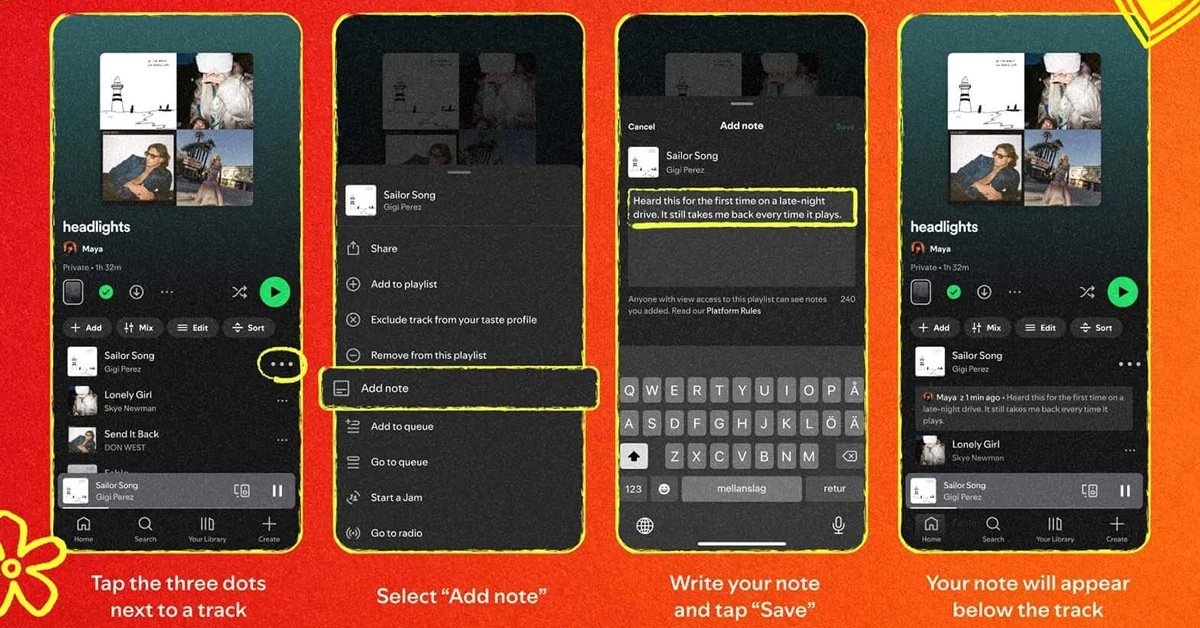
Spotify User Notes give you a short written line under an individual song inside a playlist you created or added a track to. Spotify explained the feature to press by email on 30 July 2026 rather than publishing an official newsroom post, and described it as personalization and additional context, a way of turning playlists from a collection of songs into a more personal space for music discovery. Free and Premium accounts both qualify. Users have to be 16 or over, and the rollout has reached select markets on iOS and Android.
Now read that framing as a curator instead of as a listener. A note is visible to anyone who can see the playlist, and the writer's name links back to their profile. Your annotation is signed work, attached to someone else's recording, sitting in a place people scroll through. Spotify's own visibility warning sits under the note box while you type, which tells you how the company itself sees the stakes. Everything below is about what that changes for the person building the playlist and the person hoping to land on it.
Why a Public Note Layer Changes Playlist Culture
For most of streaming history, a playlist has communicated through three things: its title, its cover image and its description. All three describe the whole. None of them can say anything about track nine specifically, which means the reasoning behind a sequence has always been invisible. A listener could feel that a playlist was well built without ever knowing why one song followed another. User Notes put that reasoning on the surface for the first time.
The shift is smaller than a new feed and bigger than a cosmetic tweak. A playlist with notes reads like a record shop shelf with handwritten cards on it. You still browse the same titles, but the shelf now has a person standing behind it. Because the note carries a name that links to a profile, the reader can follow the taste rather than just the tracklist, and that is the part with real consequences for curators who have spent years building a following without any way to speak inside their own lists.
Consider a curator who runs a 90 track playlist of slow country and folk for late night driving. Before, a new listener hit shuffle and either stayed or left. Now that curator can mark the four songs that define the mood, explain that one track was recorded in a single take, and flag the two songs that only make sense after midnight. The playlist stops being a container. It becomes an argument, and arguments are far more repeatable than containers.
What Does a Note Give a Curator That a Playlist Description Cannot?
A description works at the level of the collection. A note works at the level of the track. That distinction sounds academic until you try to explain a difficult sequencing decision, because the description is where every explanation goes to die. Nobody reads three hundred words above a tracklist to find out why song 41 belongs there.
The practical gain is targeting. You place the context exactly where the listener's attention already is, at the moment they are deciding whether to skip. A note under a song that usually gets skipped in the first fifteen seconds is a small piece of retention work, and retention is the thing playlist curators are quietly judged on. The note also survives shuffle in a way an intro paragraph never does, since it travels with the track rather than sitting at the top of the page.
| Question | Playlist description | Track note |
|---|---|---|
| Scope | The whole playlist | One individual song |
| Where it appears | Above the tracklist | Under the song inside the playlist |
| Who can add it | The playlist owner | Anyone who created the playlist or added a track to it |
| Attribution | Tied to the playlist owner | Signed, with the writer's name linking to their profile |
| Reaches shuffle listeners | Rarely | Yes, since it sits with the track |
| Per item control | Not applicable | No note level visibility setting exists |
Read the last row twice before you plan anything ambitious. There is no visibility setting specific to a note. Your only lever is the privacy setting of the playlist itself, which means the decision is all or nothing at the list level. A curator who wants half a playlist annotated for close friends and half of it public has no supported way to do that today.
How Should Editorial and User Curated Playlists Be Treated Differently?
Spotify's own editorial playlists and the lists built by ordinary users have always played different roles. Editorial lists work like radio programming, anonymous and institutional. User lists work like recommendations from a person. The note layer widens that gap rather than closing it, because a signed personal note is the one thing an institutional list cannot easily reproduce without giving up its neutral voice.
That gives independent curators an advantage worth using. If you run a user curated list, your value has always been that you are a specific person with specific taste, and the annotation makes that legible to someone who lands on your page for the first time. A generic list of 200 popular tracks with no notes now looks noticeably emptier next to a 40 track list where a dozen songs carry a sentence of reasoning. Depth beats volume in this format, since a reader can only absorb a handful of notes in one session.
There is a discipline question underneath. Notes are only useful if they say something the listener could not work out alone. "Great song" adds nothing. "Third single from the album, and the only one they still play live" adds something a listener will remember. Since the feature works in playlists you created or added a track to, contributors on shared lists inherit the same responsibility, which makes house style a real conversation rather than a nicety.
One more planning point. Notes live on mobile, on iOS and Android, and Spotify has not announced desktop or web support. If a meaningful share of your audience listens at a desk, treat annotation as an enhancement for phone listeners rather than as the backbone of your presentation.
What Changes and What Stays the Same for Artists?
Start with the disappointing half, because it prevents wasted effort. Spotify described User Notes in terms of personalization and context. Nothing in that description connects notes to payouts, to editorial placement or to any artist facing control panel. There is also no artist note feature, meaning you cannot annotate your own recording in someone else's playlist or in your own catalogue page. If you are an artist reading about this hoping for a new promotional surface you own, that surface does not exist.
What does change is the discovery conversation around your music. A listener meeting your song inside a curated list may now meet it with a sentence of framing attached, written by someone whose taste they already trust. Third party endorsement has always been the strongest form of music marketing, and this is endorsement with a name on it. A single well written note from a curator with an engaged following can do more for a track than a much larger placement on a faceless list, because context makes people finish the song.
| Area | What the note layer changes | What stays as it was |
|---|---|---|
| Discovery | Your track can arrive with written framing from a named curator | Spotify has not described any placement effect |
| Payment | Nothing in Spotify's description touches this | Streaming economics as before |
| Artist control | You gain no tool to write or manage notes on your work | No artist note feature has been announced |
| Objection route | You may want one | No artist or label appeal path is documented |
| Reach | Mobile listeners on iOS and Android | Desktop and web support has not been announced |
The row about objections deserves attention from managers rather than from artists directly. If a note attached to your recording is inaccurate, hostile or commercially damaging, no dedicated appeal mechanism for artists or labels has been documented. Spotify's general Platform Rules and User Guidelines still apply, and violations can lead to content removal or account suspension, but there is a general reporting route rather than anything built for this situation. The identity of the person reporting is not shown to the content owner, which at least removes one worry from the process.
So the realistic artist strategy is relationship work, not tooling. Curators who already play your music are now writing publicly about it, so give them something worth writing: a recording date, a story about the session, the reason the arrangement changed. You cannot write the note. You can absolutely supply the sentence that ends up in it.
How Do Collaborative Playlists Behave When Several People Annotate?
Because the feature covers playlists you created or added a track to, a shared list can end up with notes from several different contributors, each one signed with a different name and linked to a different profile. On a well run collaborative list that is a genuine feature. Four friends building a road trip playlist get four voices explaining four sets of choices, and the list gains a conversational quality that a solo list cannot fake.
On a large or loosely managed shared list, the same mechanic gets messier. Voices vary, quality varies, and there is no note level moderation button documented for the playlist owner to lean on. Nothing published so far explains what happens to a contributor's notes if that person is removed from the playlist, or what happens if the playlist changes hands. Plan on the assumption that a note you did not write may outlast your control over it.
Three habits keep this manageable. Agree the purpose of notes before you open a list to contributors, so people know whether they are writing recommendations or jokes. Keep the contributor list small enough that you recognise every name that appears. Remember the 16 and over requirement, which is easy to forget on a mixed age list: a younger contributor can still add tracks but will not be able to annotate them, so the list may look inconsistent for reasons that have nothing to do with effort.
Which Risks Are Worth Planning Around Before You Annotate?
The first risk is permanence. Spotify has not documented a procedure for editing or deleting a note, and there is no published limit on how many notes a playlist can hold. Write as though the sentence stays. A curator who annotates 200 tracks in an afternoon and later changes their house style has no documented bulk route back out of that decision.
The second risk sits in the terms rather than the interface. Notes fall under Spotify's general user content category, and there is no privacy policy clause written specifically for them. The user content licence in Spotify's terms is broad, covering reproduction, making available, display, translation, modification, derivative works, distribution and other uses. For a hobbyist that language is background noise. For a curator whose annotations are part of a professional body of work, or a writer who reuses their own copy elsewhere, it is worth reading before you commit your best material to the format.
The third risk is the open question about what happens to notes downstream. Industry publications have raised the point that it is unclear whether notes might feed recommendation models in future, and have asked Spotify to clarify. Spotify has said nothing on the subject either way, so treat both the optimistic and the pessimistic version as unproven. Separately, a different and unreleased notes feature found in the app code, described as Taste Profile Notes, is designed to influence home recommendations, and the two are easy to confuse when reading coverage.
| Risk | What is known | Sensible planning response |
|---|---|---|
| No documented edit or delete flow | Spotify has not published one | Treat every note as permanent when you write it |
| Broad user content licence | Covers reproduction, display, translation, modification, derivative works and distribution | Keep commercially sensitive writing out of notes |
| Recommendation effects | Spotify has made no statement, industry publications want clarity | Do not build a strategy on either assumption |
| Data export | A download your data tool exists, coverage of notes is not documented | Keep your own copy of annotations that matter |
| Shared list turnover | No documentation on notes after a contributor leaves | Vet contributors before opening the list |





Where the Note Layer Still Falls Short
Honesty about the gaps is part of planning well, and this feature has several. There is no desktop or web support, and no announced timeline for either, so anything you write is written on a phone. No screen has been documented where you can view all your notes in one place, which makes reviewing your own back catalogue of annotations awkward once you pass a few dozen. Whether notes are included in the download your data tool has not been documented either.
Availability is the other soft spot. The rollout covers select markets and Spotify has not published the country list, so the only reliable check is whether the option appears in your own app. Support for anything beyond playlist tracks, such as podcast episodes or albums, has not been mentioned in any coverage, and sources disagree about whether the feature reaches your saved library. A single source has mentioned a character limit and Spotify has not confirmed it, so build no editorial format that depends on a specific length.
None of that makes the feature unusable. It makes it early. Spotify described User Notes to press by email on 30 July 2026 rather than through a full newsroom announcement, and the documentation gaps line up with that quiet launch. Curators who start now get to shape the conventions of a format before those conventions harden, which is a real advantage. Just keep a copy of your best writing somewhere you control, and let the annotation be the public version rather than the only version
This article was last updated on 06 November 2026 friday. Today, 51 visitors read this article.