How to See Time Watched on YouTube (And Why It Is Wrong)
The panel takes three taps to find. Reading it correctly takes a little more work, because YouTube counts things you would never call watching.

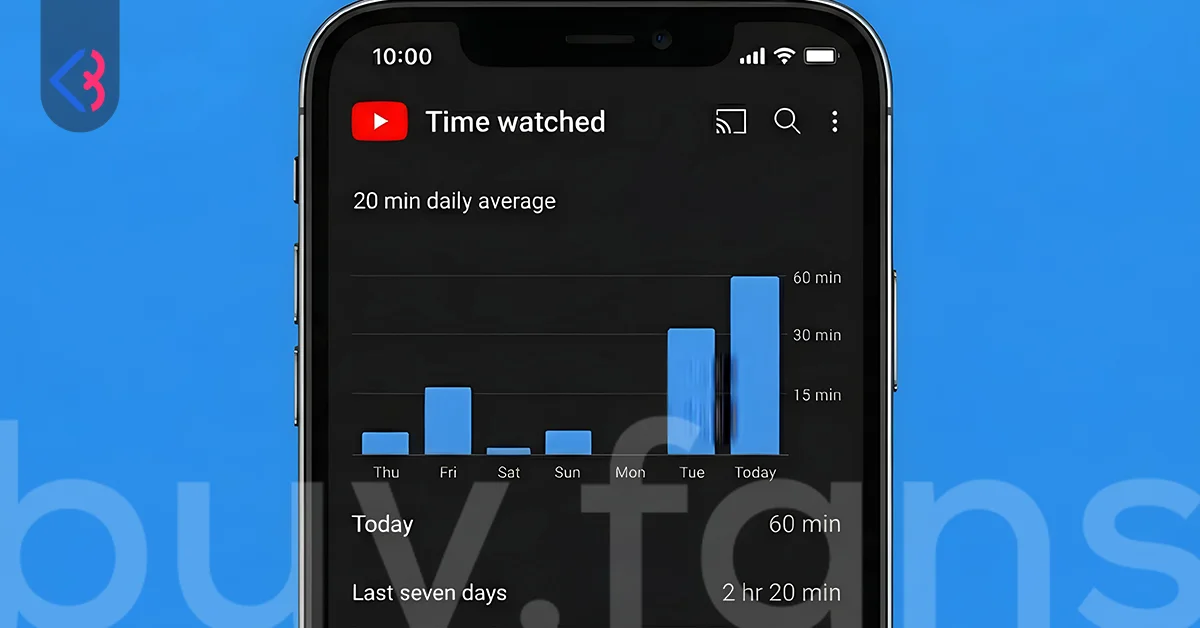
If you want to know how to see time watched on YouTube, open the mobile app, tap your profile picture, tap Time management, then tap Time watched. That is the whole path. What appears next is a small panel showing today, yesterday, your past seven days and a daily average, and most people glance at it, feel a small jolt of guilt, and close it again. The number deserves more scepticism than that. Google itself publishes a warning that viewing on computers is reported incorrectly, and several ordinary habits (background music, autoplay, private browsing) push the figure in opposite directions at the same time. This guide covers where the panel lives, what it counts, and how far off it can be.
Where does YouTube keep the time watched panel right now?
The current path in the mobile app on both Android and iPhone is profile picture → Time management → Time watched. The middle step is the one that trips people up, because older guides still tell readers to tap their profile picture and look for Time watched directly in that first menu. That shortcut existed for years and it no longer does. YouTube grouped every wellbeing control into a single Time management screen, so anyone following a 2019-era tutorial ends up scrolling a menu that does not contain what they are looking for and concludes the feature was removed.
There is a second route that lands in the same place. Open the You tab, tap the settings gear in the corner, then choose Time management. Both routes reach an identical screen, and it holds five controls rather than one: Time watched, Take a break reminder, Bedtime reminder, the newer Shorts feed limit, and Autoplay. Seeing them together matters more than it sounds, because the statistic and the tools that change the statistic sit in the same menu. If you are checking your watch history stats with any intention of acting on them, everything you need is already on screen.
One limitation to set expectations early: this panel is mobile only. There is no equivalent built into youtube.com on a desktop browser, and no announcement has surfaced suggesting one is coming. Desktop users are not left without options, but they are left without a native one.
What does the time watched panel actually measure?
The time watched profile reports four figures and nothing else. You get today's total, yesterday's total, a breakdown of the past seven days, and a daily average calculated across that same week. There is no lifetime counter, no monthly view, no yearly total, and no export button. People searching for how many hours they have watched since joining YouTube are searching for something that does not exist in the product.
The seven-day window rolls forward every day, which has a practical consequence worth understanding. A heavy weekend inflates your daily average for a week and then vanishes from the calculation entirely. Check the panel on a Tuesday after a quiet Monday and the same viewing habits can look wildly different than they did three days earlier. Treat the daily average as a rough index of a recent week rather than a description of who you are as a viewer.
Everything shown is derived from your watch history, which is the single most important fact about the panel. The history log is the source, the panel is only a summary of it, and anything that does not reach the history log cannot reach the number. That dependency is where most of the inaccuracy comes from.
| Figure shown | Time span covered | What it is genuinely useful for |
|---|---|---|
| Today | Since midnight local time | Spot-checking a single session before it gets away from you |
| Yesterday | One completed day | The most honest single figure, because the day is finished |
| Past 7 days | Rolling week, day by day | Seeing which days of the week actually carry your viewing |
| Daily average | Same rolling week, divided by seven | A trend line, but only if you check it on the same weekday each time |
Why is the number YouTube shows you probably wrong?
Start with the admission Google publishes in its own help documentation: because of a known issue, time watched on computers is reported incorrectly. That sentence sits in the official support article and almost nobody quotes it. If a meaningful share of your viewing happens on a laptop, the panel is working from data Google has already flagged as unreliable, and there is no setting that fixes it on your end.
The larger distortion is one nobody built deliberately. YouTube counts playback, not attention. Sleep meditation tracks, lo-fi study streams, eight-hour rain sounds and background music all run the counter at full speed while the phone is face down on a nightstand. Writers who have audited their own weekly figure report that a large share of their logged hours turned out to be passive audio of exactly this kind, meaning much of what looked like heavy YouTube use involved nobody looking at a screen. Anyone who falls asleep to YouTube is carrying a similar gap.
Autoplay compounds it. Leave the app running and walk away, and the next video queues automatically, then the one after that. Those minutes enter your watch history with the same weight as a video you chose and finished. In the opposite direction, private viewing disappears completely. Google states plainly that your profile does not reflect videos you removed from history or watched in incognito mode, so anything cleaned up or watched privately is subtracted from a total that was never complete to begin with. Pause watch history altogether and the statistics stop being available at all, which is the usual explanation behind a panel showing zero for someone who clearly watched something.
Then there is the app boundary. YouTube Music and YouTube TV are both excluded from the count, which sounds tidy until you consider that music videos played inside the main YouTube app are counted normally. Two people can listen to the same album for the same two hours and get completely different numbers depending on which icon they tapped. That asymmetry is invisible in the interface and it quietly makes cross-person comparisons meaningless.
| Source of distortion | Direction | Roughly how much it matters |
|---|---|---|
| Computer viewing reported incorrectly | Unknown, confirmed by Google | High for laptop-first viewers, and unfixable by the user |
| Background music and sleep audio | Inflates | Very high, up to well over half a weekly total |
| Autoplay after you leave | Inflates | Moderate, worst on TVs and unattended phones |
| Incognito viewing | Deflates | Low to moderate, depending on habit |
| Deleted history entries | Deflates | Moderate for anyone who clears history regularly |
| Paused watch history | Zeroes it out | Total, statistics stop being generated |
| YouTube Music and YouTube TV excluded | Deflates | High for people who listen inside the Music app |
One more setting works quietly in the background. YouTube offers auto-delete on watch history at 3, 18 or 36 months. Auto-delete does not touch your seven-day panel, since nothing that recent has aged out yet, but it does erase the raw material that Recap, Takeout exports and any long-range analysis depend on. Anyone who set history to clear every three months and later wonders why their export looks thin has found the reason. Check it at myactivity.google.com under YouTube History before assuming the data was never recorded.
Put those together and the panel is best read as a directional signal. If it says four hours a day, your genuine attentive viewing might be two, or it might be six. The figure tells you something real about the shape of your week. It does not tell you a fact.
Which devices and apps get counted, and which get ignored?
The panel lives on your phone, but it does not only describe your phone. Because the source is your account-level watch history, viewing signed in on a smart TV, a tablet, a games console or a desktop browser all aggregate into the same total. That surprises people who assume they are looking at a phone-specific screen time figure, and it explains why the number can look absurdly high for someone who mostly watches on a living room television.
The exclusions follow the same logic in reverse. Anything watched signed out, anything watched in incognito mode, and anything watched inside YouTube Music or YouTube TV never enters the history log, so it never enters the count. Household sharing muddies it further. One account used on a shared family TV produces a daily average that belongs to three people, and the panel has no way of telling you that.
| Where you watched | Counted? | Practical note |
|---|---|---|
| YouTube app on phone or tablet | Yes | The most reliably counted surface |
| Smart TV, streaming stick or console, signed in | Yes | Autoplay inflation is highest here |
| Desktop browser, signed in | Yes, but flagged by Google as reported incorrectly | Treat laptop-heavy totals with extra caution |
| Incognito or signed out | No | Leaves no trace in the statistics at all |
| YouTube Music app | No | Even though the same track counts inside the main app |
| YouTube TV | No | Separate product, separate history |
How can you check your YouTube time on a desktop computer?
Since there is no native panel on the web, three workarounds exist and each answers a slightly different question. A browser extension tracks going forward in real time. A Google Takeout export analyses the past. Operating system screen time tools measure the container rather than the content.
Take the extension route honestly. YouTube Watch Stats is the most visible option, sitting at version 2.0 with a May 2026 update, a date range selector covering 30 days through all time, chart output, and local-only storage that keeps the data in your browser rather than on a server. It also has 759 users and five ratings, which against a platform with billions of viewers is close to a rounding error. That is not a reason to avoid it, but it is a reason not to treat it as the answer. Alternatives circulate under names like YouTube Watch Tracker, Simple YouTube Watch Time Tracker, YouTube Time Manager and the open-source YTTracker, and their current maintenance status could not be verified, so check reviews and update dates before installing any of them. Worth flagging separately: vidIQ and Viewstats surface constantly for this search and neither one tracks personal viewing. They are creator analytics tools pointed at channel performance, not at you.
The Google Takeout route is more work and more revealing. Go to takeout.google.com, deselect everything, select YouTube and YouTube Music, restrict it to history only, set the format to JSON, create the export, then download the ZIP that arrives by email and open history/watch-history.json. The catch is fundamental. Takeout records when you watched a video, not how many minutes of it you watched, so any total built from that file is an estimate that assumes you finished everything you opened. For anyone who skips, scrubs or abandons videos halfway, that estimate runs high. Exports also typically reach back only a few years rather than to the beginning of your account.
Operating system tools are the third option and the bluntest. Digital Wellbeing on Android and Screen Time on iPhone and iPad measure how long the YouTube app stayed open, and comparable third-party utilities do the same job on desktop operating systems. That is a genuinely different question from how long video was playing. A tab left open in the background for six hours while you worked in another window registers as six hours of YouTube, and a two-hour session on a living room TV registers as nothing at all. Use these figures as an upper bound rather than a measurement, and only when the extension and Takeout routes are unavailable to you.
| Desktop method | Answers | Main weakness |
|---|---|---|
| Browser extension | How much am I watching from now on | Tiny user bases, unverified alternatives, browser-specific |
| Google Takeout export | What did I watch historically, and when | Logs timestamps not minutes, so totals are estimates |
| OS screen time (Digital Wellbeing, Screen Time, Windows) | How long was the app or tab open | Counts open windows, not playback, and misses TV viewing |
What can YouTube Recap tell you that the daily panel cannot?
YouTube launched Recap on 2 December 2025, a Spotify Wrapped style annual summary built from the same watch history that feeds the daily panel. It runs to as many as twelve cards covering your most watched channels, your dominant interests, how your habits shifted across the year, and a viewer personality label drawn from a set including Skill Builder, Sunshiner, Trailblazer, Wonder Seeker, Connector and Dreamer. Reach it from the homepage, from the You tab, or by going straight to youtube.com/Recap.
Its real advantage over the time watched profile is scope. The panel gives you seven days on one device type. Recap gives you a full year and works on both mobile and desktop, which makes it the only first-party view that answers anything resembling "what did this year of YouTube look like for me". For desktop-only viewers who cannot reach the mobile panel at all, it is the closest thing to a native option.
Set expectations on two points. Recap surfaces channels, categories and habits rather than a raw total-hours figure, so it will not settle an argument about exactly how many hours you spent. And whether it stays reachable year-round or appears seasonally in December is not something we could verify, so treat availability as uncertain rather than guaranteed.
Why do time watched and watch time point at two different dashboards?
This confusion sends an enormous amount of search traffic to the wrong page. Time watched is a viewer statistic about your own consumption, found in Time management, measured over seven days. Watch time is a creator statistic about how long other people spent watching your uploads, found in YouTube Studio analytics, measured over 28 days, 90 days, 365 days and lifetime. The words are nearly identical and the products have almost nothing in common.
The stakes differ too. Nothing rides on your personal figure except your own habits. Creator watch time is the currency of the YouTube Partner Program, where the standard route to monetisation asks for 1,000 subscribers plus 4,000 valid public watch hours in the previous twelve months. Four thousand hours is roughly 167 straight days of continuous playback, which is why channels chase it for a year or more, and why creators working toward that bar often pair a content push with a decision to buy YouTube subscribers so the subscriber half of the requirement stops being the bottleneck while the watch hours accumulate.
| Time watched (viewer) | Watch time (creator) | |
|---|---|---|
| Whose behaviour it measures | Yours | Your audience's |
| Where to find it | App → Time management | YouTube Studio → Analytics |
| Time spans available | Today, yesterday, 7 days, daily average | 28 days, 90 days, 365 days, lifetime |
| Available on desktop | No | Yes |
| Why it matters | Personal digital wellbeing | Monetisation eligibility |
| Threshold attached | None | 4,000 hours in 12 months, with 1,000 subscribers |
If a search for your viewing habits keeps returning articles about monetisation thresholds and 4,000-hour milestones, that is the ambiguity at work. Searching the exact phrase time watched rather than watch time filters most of it out.






How do you make your time watched number more useful?
Start by correcting for what you already know is wrong. Subtract your passive listening honestly. If you sleep with rain sounds playing, that is roughly seven hours a night entering the count with no attention attached, and a weekly total of 60 hours might describe 11 hours of actual viewing. Do this once and the panel stops being a source of vague guilt and starts being usable.
Then set the tools that sit on the same screen. Take a break reminder pauses playback at an interval you choose, and it interrupts autoplay chains before they run unattended. Bedtime reminder works on a schedule instead of a duration, prompting you at a set time and offering to wait until the current video ends rather than cutting off mid-sentence. Both are more effective than checking a statistic after the fact, because they act during the session rather than describing it afterwards.
The Shorts feed limit is the newest control and the most direct. It caps daily Shorts scrolling, and it now includes a zero-minute option, which switches the format off rather than rationing it. Since March 2026, parents managing supervised accounts can set that limit to zero as well. Shorts is where the gap between elapsed time and remembered time is widest, so a hard cap here changes the number faster than anything else in the menu.
Two habits finish the job. Turn autoplay off, which removes the largest single source of inflation, and check the panel on the same weekday every week so the rolling seven-day window compares like with like. Knowing how to see time watched on YouTube takes three taps. Knowing what the figure actually represents, which minutes it invented and which it quietly threw away, is the part that makes the three taps worth taking.
This article was last updated on 20 October 2026 tuesday. Today, 21 visitors read this article.