What Does Instagram First Draft Actually Do to Your Footage?
A plain read on Instagram's automated trimming feature, what it touches, what it leaves alone, and where your Reels drafts sit while you decide.
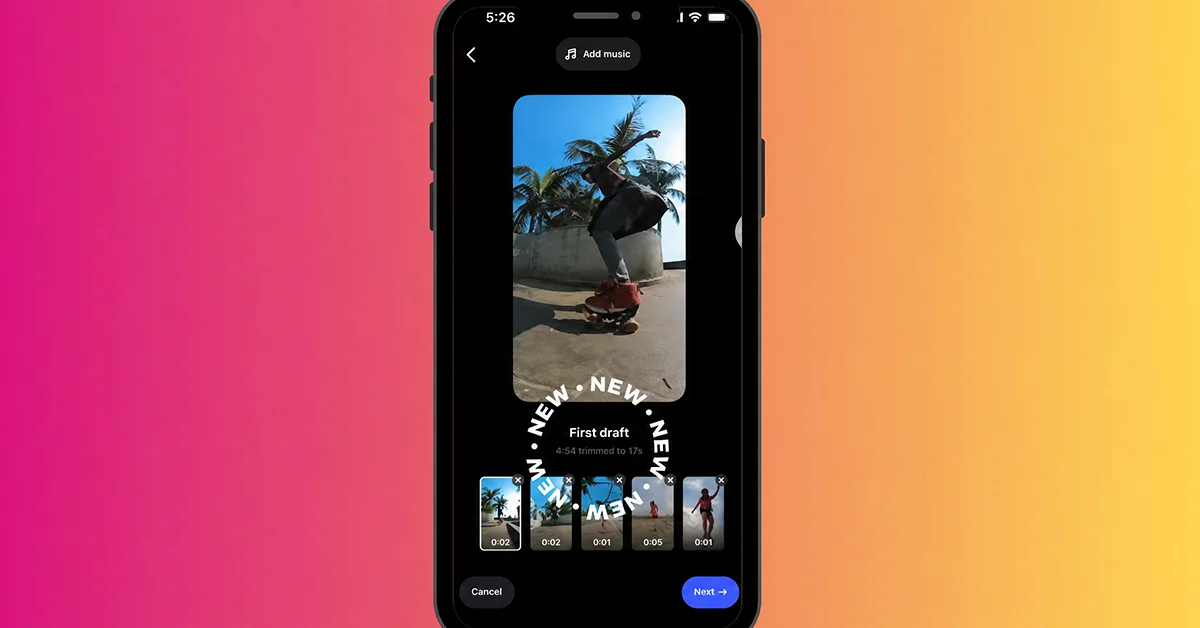
Instagram announced First Draft on 25 August 2026 through posts on its creators account, on Threads and in the Instagram feed. No blog post accompanied it. No help centre page had appeared by the following day. For a feature that touches the editing step of every Reel, the documentation is thin. Coverage that guessed at the details filled the gap.
Some of those guesses are wrong in ways that matter to you. If you sit down expecting the tool to score your video with a trending sound and drop transitions between shots, you will be disappointed within ten seconds. What it does is narrower than that, and more useful day to day than it first sounds.
Here is the honest version, built only from what Instagram actually said, plus the parts Instagram would not say.
What Instagram First Draft Actually Does to Your Footage
You pick one or more clips inside Instagram. The tool then produces a rough cut. It finds the pauses and silences in your footage and cuts them, shortens the clips, and stitches what remains into a single sequence. According to Instagram, that first draft lands in under ten seconds.
Nothing is locked. Instagram's own wording is that you can undo everything the tool does, then reorder the clips, remove them, adjust them, or start from scratch. Most coverage skipped that reversibility. It is the reason the feature is worth trying even if you distrust automated editing, because a bad cut costs you a few seconds rather than a session.
Picture five clips from a kitchen counter: you talking, a pan shot, you talking again, a mistimed pause while you reach for something, and a closing line. First Draft collapses the dead air and hands you a rough cut. Your own footage stays in your own order, minus the stretches where nothing happens.
| The tool does this | The tool does not do this |
|---|---|
| Trims pauses and silences in talking footage | Add music of any kind |
| Shortens individual clips | Apply transition effects |
| Stitches multiple clips into one sequence | Process photos |
| Produces a first cut in seconds | Generate captions or subtitles |
| Keeps every action reversible | Apply templates |
| Works without leaving the Instagram app | Use AI |
Why Does Instagram Say This Is Not an AI Tool?
Because Instagram said so directly. An Instagram spokesperson stated that the tool does not use AI, and the word does not appear anywhere in the official announcement. That is unusual in 2026, when almost every feature launch reaches for the label whether or not it applies.
Instagram also declined to explain how the tool analyses video, so the method is unknown. Silence detection has existed in editing software for years without any machine learning involved. Audio-level thresholds are an ordinary way to find dead air. Nobody outside Instagram can confirm which approach is running here, and the write-ups that describe the internals are filling a gap with confidence they have not earned.
For your workflow the label matters less than the behaviour. Automated trimming produces a draft you can edit. Judge it the way you would judge any rough cut. Did it save you time, and did it cut anything you wanted to keep?
What Does It Not Do That People Assume It Does?
Three assumptions keep showing up, and all three are imports from a different product. Automatic beat-matched music and automatic transitions are CapCut Auto Cut behaviours. Somewhere in the first day of coverage they got attached to First Draft, and the claim spread faster than the correction.
The photo assumption is the third. The tool handles video clips only. If your plan was to feed the tool a mix of stills and footage and get a montage back, that is not what happens. Nothing in Instagram's description mentions photo support, and no source has demonstrated it.
Say you shoot a two-minute walkthrough and hand it to the tool expecting a finished Reel with a trending sound and clean cuts between shots. You will get the cuts. Sound, text, cover frame and anything decorative remain your job in the full editor afterwards.
| Common assumption | What actually happens |
|---|---|
| Adds trending audio automatically | No music is added at any stage |
| Inserts transitions between clips | Clips are joined without effects |
| Combines photos and video | Video clips only |
| Writes captions for you | No caption or subtitle output |
| Applies a template or preset style | No templates involved |
| Runs on AI | Instagram said the tool does not use AI |

Does Automated Trimming Affect Your Reach?
Nobody knows, and anyone who tells you otherwise is guessing. The feature is a day old, so distribution data for it cannot exist. The confident percentages circulating about original content and algorithmic favour have no source anyone can check.
The narrow version holds up better. A tighter cut removes dead air, and dead air is where people leave. Whether that turns into measurable distribution depends on the video and on who is watching it. Your own retention curve will answer that, not a launch article, so treat the tool as an editing convenience and give your numbers a few weeks.
One related area does get misreported constantly, so it is worth setting straight while you plan length.
| Reels length question | The accurate answer |
|---|---|
| Standard account upper limit | 3 minutes, or 180 seconds |
| Extended uploads | Some accounts can upload up to 20 minutes |
| Instagram's own recommendation | Reels longer than 3 minutes are not recommended to new audiences |
| The commonly repeated "60 second limit" | Outdated, and wrong for standard accounts |
| The "15 seconds is ideal" advice | Advice from around 2020, no longer current |
The distinction between a technical limit and a recommended limit is where most length advice falls apart. You can publish a long Reel. Whether Instagram pushes it to people who do not already follow you is a separate matter, and there the platform draws its own line at three minutes.
How Does a Rough Cut Change Your Editing Order?
Traditional phone editing runs in one direction. You import, scrub through everything, delete the failures, arrange what survives, then polish. The slow part is the scrubbing, and it is slow because you are making dozens of small keep-or-cut decisions on footage you have already watched twice.
A rough cut inverts the entry point. You start with something assembled and react to it, which is a different cognitive task and a faster one. Spotting a bad cut in an assembled sequence is quick. Hunting for it in raw footage is not. Instagram framed the tool the same way. Its wording is that you are still the creative director and that what you get is a starting point to build on, not a decision.
The practical gain shows up on days when you have too much footage. Twelve minutes of raw clips from an errand run is not a project you want to open at eleven at night. A rough cut of that same footage is something you can judge in one viewing and either accept, fix or abandon.
| Stage | Manual order | Rough cut first |
|---|---|---|
| Opening move | Scrub the full raw footage | Watch an assembled draft |
| First decision | Which sections to keep | Whether the draft is close enough |
| Where time goes | Finding and removing dead air | Fixing the few cuts that are wrong |
| Failure cost | Wasted review time before you know | You know within one viewing |
| Creative control | Complete from the start | Complete, applied after the first pass |
Is First Draft the Same Thing as the Edits App?
No, and conflating them is the most common technical error in the coverage. Edits is a standalone video editing app from Meta, released in April 2025, which you download and open separately. First Draft is a feature living inside the Instagram app itself.
Different products in different places. Edits is a full editing environment with its own project structure and its own feature set, and it includes an assistant that surfaces content ideas from views and retention data. First Draft does one narrow thing and hands the result to Instagram's own editor.
Anyone whose routine is already built around a separate editing app should not expect First Draft to replace it. If you shoot on the phone, edit in Instagram and publish there, the feature slots into what you already do without adding an app to your home screen.
| First Draft | Edits | |
|---|---|---|
| Where it lives | Inside the Instagram app | Standalone app you install |
| Released | 25 August 2026 | April 2025 |
| Scope | Automatic trimming and stitching | Full editing environment |
| Output destination | Instagram's own editor, then publish | Export or publish |
| Relationship | A step before editing | The editing itself |
How Does It Compare With a Full Editor?
Narrowly, and deliberately. A full editor gives you a timeline, audio control, text layers, speed ramps, colour work, keyframes and export settings. First Draft gives you none of that. What it gives you is the opening stretch of the job done before you open the timeline.
Comparing the two on feature count is like comparing a kettle to a stove. The nearest existing behaviour is Adobe Firefly's Quick Cuts, which also assembles long clips automatically. CapCut's Auto Cut goes considerably wider, with beat detection, captions, templates and transitions in the same flow. First Draft is the smaller tool of the three. It sits where your footage already is.
That location is the real argument for it. You are not exporting, switching apps, waiting for a render and re-importing. For a creator publishing several times a week, taking those app switches out of the routine changes the day more than a colour wheel would.
Where Do Your Instagram Reels Drafts Live?
Your unpublished Reels sit on your own profile, in the Reels tab, above the ones you have already published. They are visible only to you when you are logged in, and a selection mode lets you clear several at once when the list gets long.
Drafts also go missing more often than people expect, and there is usually a mundane reason. Instagram stores a draft against the app on the device where you made it. Log out, reinstall the app, clear its storage or move to a new phone and the drafts can go with it. Switching between accounts on the same phone hides the drafts belonging to the other account, and that hiding reads as deletion. A fair number of "missing" drafts were never Reels drafts at all. They came from Stories, which puts them somewhere else.
A draft is invisible by design, and nothing about it reaches an audience. Only publishing does that. Once the Reel is live, some accounts pair the release with Instagram view packages from services such as buy Instagram Reels views, on top of the ordinary work. The ordinary work is posting on a schedule and giving each video a decent cover frame. No service decides how the feed treats your video, and none should be described as if it did. A finished draft on your profile stays exactly where it is until you press publish.
Can Anyone Else See Your Drafts?
Not through the app in any normal sense. Drafts are not published, so they do not appear in anyone's feed, on the Explore surface, or on the public version of your profile. A follower opening your profile sees your published Reels and nothing else.
The realistic exposure is account access rather than platform visibility. Say someone else has your login, or a team shares one brand account across several phones. Whoever is signed in on the device where the draft was made can open it, and a social media manager working from a shared account is the usual example. The drafts they see are the ones saved on their own device. Treat a draft the way you treat anything else behind a shared login, as visible to everyone holding the password.
There is a small practical consequence for collaborative work. Because a draft lives with one device and one signed-in account, you cannot hand it to a colleague to finish. Either you share the raw footage, or the person who made the draft publishes the Reel and the account takes it from there.


Which Kinds of Footage Suit This Tool?
Instagram named three types when it announced the feature: multi-clip montages, talking-to-camera videos, and everyday life content. All three contain a lot of material nobody needs to watch. Think of the gap before you start speaking, or the second where you check your framing.
Footage that resists the tool is footage where silence is doing work. A tension beat before a punchline, or a slow reveal that depends on nothing happening for two seconds. Automated trimming reads those as dead air, because at audio level they are indistinguishable from a mistake. You can undo any of it. If half your video is deliberate pacing, though, you will spend longer restoring cuts than you would have spent making them.
A two-minute recipe video is a good test case. Chopping, waiting, talking, waiting, plating: the tool has plenty to remove and very little of it is precious. A thirty-second scripted piece where every beat was timed on set is the opposite case, and probably not worth running through it.
| Footage type | Fit | Why |
|---|---|---|
| Multi-clip montage | Strong | Lots of unusable material between usable moments |
| Talking to camera | Strong | Pauses and restarts are the main waste |
| Everyday life clips | Strong | Long gaps where nothing happens |
| Scripted, timed pieces | Weak | Silences are intentional and get cut |
| Music-led edits | Weak | No audio handling, so timing has to be rebuilt |
| Photo sequences | Not supported | Video clips only |
Run it on the footage where you already dread the first pass. Keep it away from the work where pacing is the point. That is roughly the whole decision. One day into the feature's life, nobody has the evidence for a more precise rule than that.
This article was last updated on 31 October 2026 saturday. Today, 6 visitors read this article.