Should Your Instagram Reel Have Captions or On-Screen Text?
Instagram treats them as two features with two jobs. Picking the right one starts with what your reel actually sounds like.
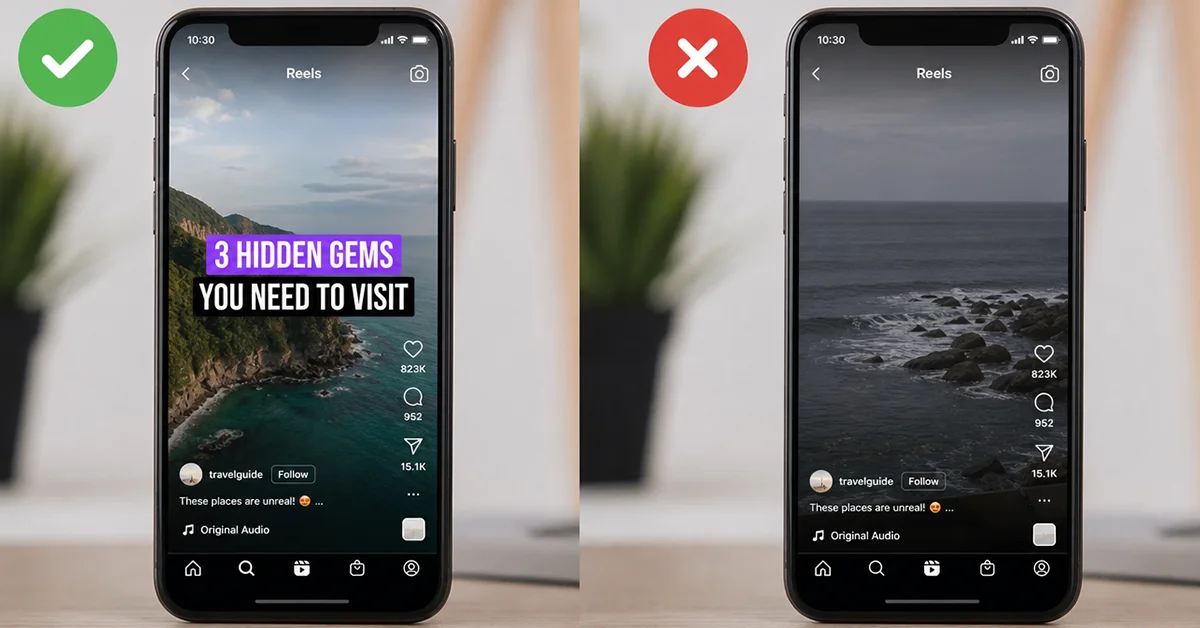
Most guides fold both features into a single task called adding text to a reel. Instagram's own creation guide keeps them apart in one sentence, and that sentence settles most of the argument. Text overlays highlight the moments you choose, while captions make your entire spoken audio visible.
The word captions carries three meanings in English, which is why search results on this topic look so muddled. There is the Captions sticker you add yourself, there are closed captions the viewer switches on, and there is the post description that people also call a caption. Each one belongs to a different person and does its own job.
As of 30 September 2026, nothing Instagram publishes connects either feature to how far a reel travels. The argument for both rests on accessibility and attention rather than distribution, and this page will not pretend otherwise. The decision comes down to what is actually inside your reel.
What Does Instagram Say About Captions And Text Overlays?
Instagram's updated creation guide belongs to its Tips and Tricks series and went up around 28 September 2026, although the page itself carries no publication date. Inside it, the company draws a line that almost no competing article repeats. Text overlays highlight the moments you select. Captions make the whole of the spoken audio visible. The guide then says the two work well together and serve different purposes.
Read that as a difference between selection and completeness. An overlay is an editorial act, because you decide which words appear and exactly when. A caption track is a transcript, so it covers everything said whether or not you would have picked those words yourself. One directs attention; the other removes a barrier.
Nothing in that wording sets the features against each other. The real question is not which one wins, but which job your particular reel needs doing. A reel with no speech has no transcript to make, and a reel built on an explanation has a barrier that overlays cannot remove on their own.
Before any decision, separate the layers people lump together under one word. The table splits them by who controls each one, what it covers and where it shows up.
| What it is | Who controls it | What it covers | Where it appears
|
|---|---|---|---|
| Captions sticker | You, while editing the reel | Everything spoken in the reel's audio | On the reel itself, visible to anyone who watches |
| Closed captions | The viewer, in their own settings | Spoken audio, when that viewer has the setting on | Across the app for that person only |
| Text overlay | You, while editing the reel | Only the words you type | On screen at the times you set |
| Post description | You, when publishing | Context, credits and a call to action | Under the reel, not on the video |
What Is The Instagram Captions Sticker And Where Does It Come From?
The Captions sticker lives in the Stickers menu on the editing screen. Pick Captions there and Instagram generates the text automatically from the audio already in your reel. You type nothing by hand. The source is the speech in the clip, which explains both the strength and the limit of the feature.
Two things follow from that. A reel with music and no speech gives the sticker nothing to transcribe, so reaching for it there is wasted effort. Because Instagram builds the text from whatever the microphone picked up, clear speech gives it more to work with. Read the result back before you post.
Instagram publishes no accuracy figure for the feature, and no supported-language count could be confirmed against an official source, so neither appears here. Treat the sticker as a strong default for spoken reels rather than a perfect transcript. Background noise and overlapping voices will test it hardest.
The post description sits outside all of this. It carries context, credits and a call to action for people who stop and read. For somebody watching the reel itself with the sound off, it does nothing at all.

Who Controls Closed Captions On An Instagram Reel?
Closed captions belong to the viewer rather than to you. The setting sits in the accessibility area of account settings, and each person switches it on or off inside their own app. You cannot turn it on for an audience, and you have no way of knowing whose is already on.
The exact label and position of that setting could not be verified against a current official page, so no tap sequence appears here. Expect the wording to shift between app versions. Guides that print a confident menu path are often describing an older build of the app.
Anything the viewer controls sits outside what you deliver. The Captions sticker is the only caption layer you can count on when a stranger meets your reel.
That distinction also explains a common complaint. Somebody watches a reel, sees no captions and assumes the creator skipped them. In fact the viewer-side setting was off and no sticker was ever added. Two separate systems were involved, and neither one was switched on.
What Do Text Overlays Do And How Does Their Timing Work On A Reel?
You add text overlays from the Aa icon on the editing screen. Pick the font, the colour and the alignment, then place the text where you want it in the frame. Instagram's stated purpose for the feature is highlighting the moments you choose, a narrower and more deliberate job than transcription.
Timing is the part most guides skip entirely. A timeline under the video sets when each piece of text appears and when it disappears. You can add more than one text layer, and every layer gets its own timing. Overlay work is therefore scheduling as much as it is writing.
That timeline is what makes overlays useful on a reel where things happen in sequence. A label can arrive exactly when the thing it names appears, then leave before it crowds the next shot. A text to speech option also sits alongside it for creators who want typed words read aloud.
Thinking in layers rather than in captions keeps the job clear. Each layer answers one question about the frame it sits on, and the timeline decides how long that answer stays up.
| Text control | What it sets | Decision it drives
|
|---|---|---|
| Font, colour and alignment | How the words look against the footage | Readability over a busy or bright shot |
| Timeline in and out points | When each layer appears and disappears | Whether the label matches the moment |
| Multiple text layers | How many separate messages the reel carries | One idea per layer, rather than one block of text |
| Text to speech | Whether typed words are also read aloud | Useful when nobody speaks on camera |
When Is On-Screen Text Alone Enough For A Reel?
On-screen text alone covers any reel where nothing is spoken. Music-led clips, silent demonstrations and before-and-after shots carry their meaning in what you see. There is no spoken audio to make visible, so a transcript would have no material to work from in the first place.
A reel that runs only a few seconds is the other clear case. There is room for one line and very little else, and a running transcript would fight the footage for the same space. Pick the single sentence that has to land, then give it the frame it needs.
Text alone also suits reels where the words are labels rather than speech. Prices, ingredient names, step numbers and place names work better as text overlays, because each one needs to sit next to the thing it describes. A transcript would list them in the order they were said, which is rarely the order a viewer needs.
| Reel type | What carries the meaning | Recommended layer
|
|---|---|---|
| Music-led clip with no speech | Footage and audio mood | Text overlay only |
| Silent demonstration or before-and-after | What is shown on screen | Overlay labels at each change |
| Piece to camera | The spoken words | Captions sticker, plus one overlay for the opening line |
| Voiceover over supporting footage | The spoken words | Captions sticker, overlay only where a term needs pinning |
| Interview or two voices | The spoken words | Captions sticker, overlay for names |
| Explanation with visible steps | Speech and on-screen steps | Both, placed in different parts of the frame |
| Trend clip built on one idea | A single line | One text overlay |

When Does An Instagram Reel Need Captions No Matter What?
Captions earn their place whenever the meaning lives in what is said. Mute your own reel and watch it back once. If it stops making sense, the transcript is not decoration. Pieces to camera, voiceovers, interviews and explanations all fail that test the moment the sound goes.
The accessibility argument stands on its own without any help from performance claims. Viewers who are deaf or hard of hearing cannot reach spoken audio at all. Viewers in a quiet office or on a loud train often keep the sound off by choice. Instagram publishes no figure for how common sound-off viewing is, and the percentages repeated across guides do not come from Instagram either.
Readable audio also changes what a viewer does in the first moment. Somebody arriving with the sound off can either read what is being said or scroll on, and only one of those outcomes keeps them with your reel. Accounts that buy Instagram Reels views while an audience builds meet that moment far more often. Every one of those viewers still decides whether the reel makes sense in silence. No official source measures that effect, so treat it as reasoning rather than a published result.
The cost comparison is lopsided in one direction. Adding the sticker takes frame space that a spoken reel was always going to need. Leaving it off costs you every viewer who could not hear the part that mattered, and you will never see those people in any number you look at.
How Do Captions And Text Overlays Share One Reel?
The two features share a reel by splitting the frame and the timeline between them. A caption track runs alongside the speech for as long as somebody is talking. Overlays appear in bursts, at the points you decided were worth marking. Trouble starts only when both land in the same place at the same second.
On a reel carrying one idea and one spoken line, give each layer a single home. Put the overlay high in the frame and let the caption text sit low, or drop the overlay entirely and let the transcript do the whole job. Repeating the same words in both layers wastes the space twice over.
When a reel carries several spoken sections, the transcript runs throughout while the overlays mark the joins. A short label at the start of each section tells a viewer where they have arrived, and the caption track keeps the detail readable underneath. Interface elements sit over parts of the frame, so keep both kinds of text clear of the edges.
One rule survives every version of this decision. Never let an overlay repeat a sentence the caption track is already showing. The viewer then reads the same thing twice and looks at the footage half as long.








What Do Captions And Text Overlays Not Promise On Instagram?
Neither feature comes with a distribution promise attached. Instagram's stated route to being recommended runs through content that is high quality, original and interesting from the first second. Reels are built to reach past your existing followers. Captions and overlays appear nowhere in that description, and no official material links either one to ranking.
The claims you meet elsewhere deserve a flat answer. No official source ties captions to reach. No official source ties overlays to how far a reel travels. The sound-off percentages quoted in guides have no Instagram origin, and the reach multipliers attached to captions have no traceable source at all.
What both features actually do is solid enough without the inflation. One makes speech readable for people who cannot hear it or have chosen not to. The other points at the part of the frame you want noticed, exactly when you want it seen. Judge them on that, and the decision stops being a gamble.
| Feature | What it does | What it does not do
|
|---|---|---|
| Captions sticker | Makes spoken audio readable for everyone who watches | Carries no distribution promise and does not replace the post description |
| Closed captions | Lets a viewer read spoken audio whenever they want it | Cannot be switched on by you for your audience |
| Text overlay | Highlights chosen moments and times them to the footage | Covers no speech beyond the words you typed |
| Post description | Gives context, credits and a call to action | Does nothing for a viewer watching in silence |
Run the decision in the order your reel hands you. If somebody speaks, add the Captions sticker. A moment that needs pointing at gets an overlay, timed to land with it. If nothing is spoken at all, overlays are the whole job, and the post description stays underneath doing something different entirely.
This article was last updated on 24 October 2026 saturday. Today, 2 visitors read this article.